


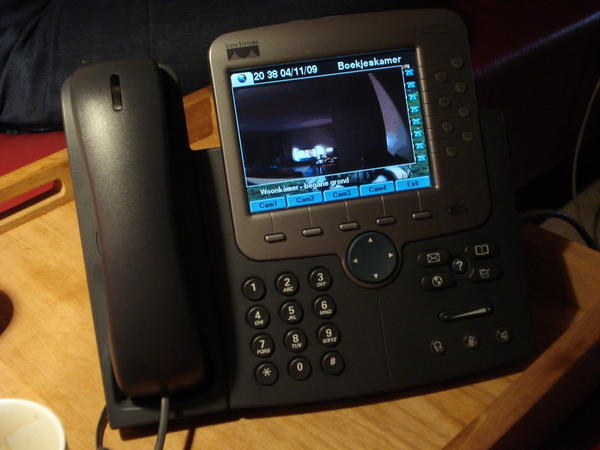
If you own a cool Cisco 7970 IP Phone, and you have an ip webcam, then this script could be interesting for you. It is possible to show your ip camera in de serviceURL of you 7970 phone. What you need is a webserver to host you menu.xml and your cam.php script. I use a Axis 207W IP camera, but the script should work on all posible cameras.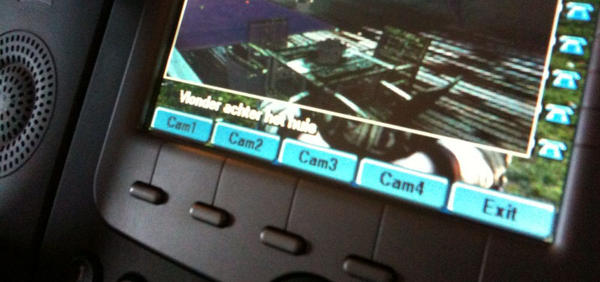 |
 |
You need to define your ServiceURL in your config-file (SEP0xxxxxxxx.cnf.xml) of your 7970 iphone.
<servicesURL>http://192.168.8.6/menu.xml</servicesURL>
In this file you can define the menu for your services button.To publish the cam script use this code:
<CiscoIPPhoneMenu>
  <Title>IPAS XML Services</Title>
  <Prompt>Please make your selection.</Prompt>
  <MenuItem>
    <Name>Axis Netcamera </Name>
    <URL>http://192.168.8.6:/cam.php</URL>
  </MenuItem>
</CiscoIPPhoneMenu>
This is the actual php script wich generates the xml output and shows a png-image converted from an image of your Ip-camera. The script supports 4 different cameras and softkeys.
I created the script for use with apache and ImageMagick on linux. It is important that you have the php-pecl-imagick modules installed in your apache. This module is needed to convert the jpeg-image to png format and resize the image to match the 7970 browser. Remember to edit the variables in the script to your need.
<?php
////////////////////////////////////////////////////////////////////////
// IP-Camera image on your Cisco 7970G IP-phone
////////////////////////////////////////////////////////////////////////
// This simple script downloads an image from your ip-camera (Axis) and
// convert the image to a 7970G browser format.
// Script by ipas 27-10-2012
////////////////////////////////////////////////////////////////////////
// You need php-pecl-imagick installed on your apache-server
////////////////////////////////////////////////////////////////////////

$camurl1="http://cam1.domain.com/axis-cgi/jpg/image.cgi";
$camtext1="Keuken";
$buttontext1="Keuken";
$camurl2="http://cam1.domain.com/axis-cgi/jpg/image.cgi";
$camtext2="Oprit - Voordeur";
$buttontext2="Oprit";
$camurl3="http://cam1.domain.com/axis-cgi/jpg/image.cgi";
$camtext3="Woonkamer";
$buttontext3="Woonkmr";
$camurl4="http://cam1.domain.com/axis-cgi/jpg/image.cgi";
$camtext4="Terras";
$buttontext4="Terras";
$camurl5="http://cam1.domain.com/axis-cgi/jpg/image.cgi";
$camtext5="Garage";
$buttontext5="Garage";
//the path to the imagefile. must be world-writable! chmod 777
$imagepath="/home/www/cam-image/image.png";
$imageurl="http://cisco-cam.domain.com/cam-image/image.png";
$camscripturl="http://cisco-com.domain.com/cam.php";

////////////////////////////////////////////////////////////////////////
$cam=3;
$cam=$_REQUEST[cam];
if ($cam==1){
  $camurl=$camurl1;
  $camtext=$camtext1;
  } elseif ($cam==2){
  $camurl=$camurl2;
  $camtext=$camtext2;
  } elseif ($cam==3){
  $camurl=$camurl3;
  $camtext=$camtext3;
  } elseif ($cam==4){
  $camurl=$camurl4;
  $camtext=$camtext4;
  } else {
  $camurl=$camurl5;
  $camtext=$camtext5;
  }

  // Get the image from the camera
  $image = file_get_contents($camurl);

  // Create Imagick object
  $im = new Imagick();

  // Convert image into Imagick
  $im->readimageblob($image);

  // Resize image to match a cisco 7970 browser
  $im->resizeImage(296,166,Imagick::FILTER_LANCZOS,1);

  // Add a subtle border
  $color=new ImagickPixel();
  $color->setColor("rgb(220,220,220)");
  $im->borderImage($color,1,1);
  $im->setImageChannelDepth(imagick::CHANNEL_RED, 5);
  $im->setImageChannelDepth(imagick::CHANNEL_GREEN, 12);
  $im->setImageChannelDepth(imagick::CHANNEL_BLUE, 12);

  $im->setImageFormat("png");
  // Output the image
  $output = $im->getimageblob();
  $outputtype = $im->getFormat();

// output to file
  $fp = fopen($imagepath, 'w');
  fwrite($fp, $im);
  fclose($fp);

$output= "
<CiscoIPPhoneImageFile>
  <Prompt>" . $camtext . "</Prompt>
  <URL>" . $imageurl . "</URL>
  <SoftKeyItem>
    <Name>" . $buttontext1 . "</Name>
    <URL>" . $camscripturl . "?cam=1</URL>
    <Position>1</Position>
  </SoftKeyItem>
  <SoftKeyItem>
    <Name>" . $buttontext2 . "</Name>
    <URL>" . $camscripturl . "?cam=2</URL>
    <Position>2</Position>
  </SoftKeyItem>
  <SoftKeyItem>
    <Name>" . $buttontext3 . "</Name>
    <URL>" . $camscripturl . "?cam=3</URL>
    <Position>3</Position>
  </SoftKeyItem>
  <SoftKeyItem>
    <Name>" . $buttontext4 . "</Name>
    <URL>" . $camscripturl . "?cam=4</URL>
    <Position>4</Position>
  </SoftKeyItem>
  <SoftKeyItem>
    <Name>" . $buttontext5 . "</Name>
    <URL>" . $camscripturl . "?cam=5</URL>
    <Position>5</Position>
  </SoftKeyItem>
</CiscoIPPhoneImageFile>
";

header("Content-type: text/xml");
header("Connection: close");
header("Expires: -1");
echo $output;

?>





Leave a Comment
You must be logged in to post a comment.